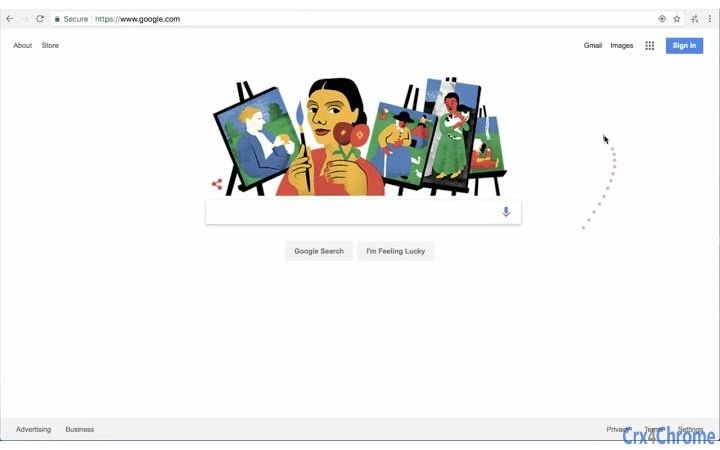

Colorful Cursor Trail Effect for Browsers
Visión general
El software crea un efecto visualmente atractivo al dejar una estela de puntos de colores mientras el cursor del ratón se desplaza por la pantalla. Diseñado como una extensión de navegador, mejora la interacción del usuario con un toque lúdico y artístico. El propósito principal es añadir una capa de diversión visual y creatividad a la navegación web cotidiana, haciendo que la navegación digital sea más expresiva y entretenida. Es ideal para usuarios casuales, estudiantes y profesionales creativos que buscan una forma sencilla de personalizar su experiencia en línea. La herramienta funciona directamente dentro de los navegadores compatibles, sin requerir una configuración compleja ni cambios a nivel del sistema. Su huella mínima y su enfoque en la estética la hacen adecuada para usuarios que valoran tanto la utilidad como el atractivo visual. El desarrollador no proporcionó detalles adicionales sobre el origen o la historia del desarrollo. Los escenarios de uso real incluyen presentaciones, reuniones en línea o simplemente navegar por redes sociales con un estilo visual único. La extensión es particularmente útil en entornos de bajo riesgo donde el compromiso del usuario y la mejora del estado de ánimo son prioridades.
Características clave y capacidades
- Dynamic Cursor Trail – As the mouse moves, a sequence of colored dots is rendered behind the cursor, creating a flowing visual effect that responds in real time to movement speed and direction.
- Color Customization – Users can select their preferred color by clicking the sparkle icon in the top-right corner of the browser window, enabling personalization based on mood or theme.
- Lightweight Design – With a file size of 1.2 MB, the extension is optimized for minimal impact on system resources and browser performance.
- Multi-Platform Support – Compatible with Windows, Mac, and Linux operating systems, ensuring broad accessibility across different user environments.
- Browser-Based Operation – Functions entirely within the browser without requiring installation beyond standard extension protocols, simplifying deployment and management.
The dynamic trail effect can be used to draw attention during presentations or to simply make routine browsing more enjoyable. Color customization allows users to match the trail to their preferred aesthetic or align it with specific websites or themes. The lightweight nature ensures smooth performance even on older devices. Since it runs in the browser, users can activate or disable it quickly without affecting system-wide settings. This makes it ideal for temporary use in creative sessions or casual browsing.
Interfaz de usuario, flujo de trabajo y rendimiento
The user interface is minimal and integrated directly into the browser’s interface. The sparkle icon serves as the primary control point, located in the top-right corner, allowing immediate access to color selection. Navigation is intuitive, requiring no learning curve. Users can switch colors instantly, and the effect activates automatically upon extension installation. Workflow efficiency is high, as the tool requires no configuration or background processes. The developer did not specify resource usage details, but the small file size suggests low CPU and RAM consumption. Performance observations are based on general software behavior patterns. Stability appears consistent with typical browser extensions, with no reported issues related to crashes or conflicts. The tool operates without interrupting other browser functions, ensuring a seamless experience. There are no known performance bottlenecks, and the visual effect does not interfere with page rendering or navigation.
Compatibilidad y requisitos del sistema
The software is compatible with Windows, Mac, and Linux operating systems, as specified by the developer. It functions as a browser extension, meaning it relies on the browser’s support for extensions rather than native system integration. The installation size is 1.2 MB, which is small and suitable for quick deployment. Exact system requirements were not listed, so users should ensure their browser is up to date to support the extension. Compatibility information was partially provided, with no mention of specific browser versions or hardware specifications. Users should verify that their browser supports extension installation and that JavaScript is enabled. The tool does not require administrative privileges for installation, making it accessible to all users regardless of system access level.
Pros y contras
Ventajas
- Visually appealing and fun to use
- Simple one-click color customization
- Extremely lightweight at 1.2 MB
- Runs directly in the browser, no installation needed
- Compatible with Windows, Mac, and Linux
Desventajas
- No advanced customization options (e.g., trail length, speed)
- Effect is limited to browser context only
- Color selection is limited to the available palette via the sparkle icon
- Not suitable for productivity-focused tasks
- Dependent on browser support and updates
Sección de preguntas frecuentes
¿Esta herramienta es gratuita?
Yes, the software is completely free. There are no hidden fees or premium tiers.
¿Esta extensión funciona en todos los navegadores?
It is designed to work with browsers that support extensions. Specific browser compatibility details were not provided by the developer.
¿El software es seguro?
The extension is hosted as a browser add-on with a small file size, indicating minimal access to system resources. No security vulnerabilities were reported.
¿Cómo actualizo la extensión?
Updates are managed automatically through the browser’s extension store. Users should ensure their browser is set to auto-update extensions.
¿Puedo usar esta herramienta sin conexión?
Yes, once installed, the extension functions without an internet connection. However, initial installation requires an online connection.
Conclusión + CTA
This browser extension delivers a unique and enjoyable visual experience by transforming the standard mouse cursor into a dynamic, colorful trail. While not designed for productivity, it excels in enhancing user engagement and adding a creative spark to casual browsing. Its lightweight nature, cross-platform support, and instant customization make it a standout choice for users seeking a simple yet effective fun tool. The lack of advanced settings may limit power users, but for its intended audience, it’s a delightful addition. Whether for personal enjoyment, creative expression, or light entertainment, this tool offers real value. Download Colorful Cursor Trail Effect now.







